
What Is a Pillar Page & How to Create One + Examples
What Is a Pillar Page?
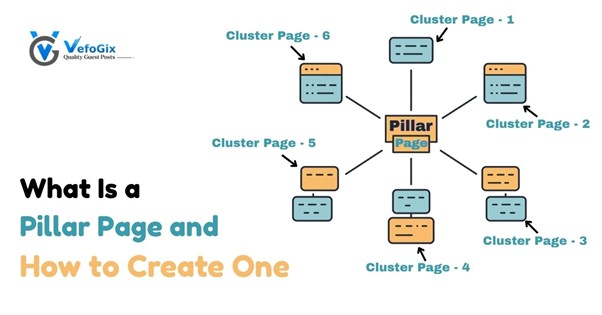
A pillar page is a long, detailed piece of content that covers a broad topic. It gives readers a solid overview and links to other, more focused articles on related subtopics. These linked articles are called clustered content. This serves as the basis for your pillar page strategy. This approach not only organizes your content but also improves your website's SEO.
Pillar pages are important since they enhance user experience by means of organized material addressing several queries connected to a common issue. For companies like VefoGix, using a pillar page Seo approach could result in more visitors, improved interaction, and a stronger online authority.
Pillar pages are absolutely important in digital marketing. They provide a central point for information, hence enabling users to quickly locate linked material. For example, when companies like pillar page VefoGix approach, they build a systematic tool that increases user experience, strengthens SEO results, and defines authority in their sector. Pillar pages can increase traffic, enhance interaction, and gain more online prominence by offering useful, structured material.
Characteristics of a Pillar Page
• Comprehensive Coverage
A well-organized pillar page links to more particular pieces and addresses a wide range of subjects completely. This strategy guarantees that consumers discover a lot of information in one place, hence facilitating their deeper exploration of particular topics of interest.
• User-Friendly Design
Well-designed pillar pages are aesthetically pleasing and made for simple navigation. A user-friendly design improves the experience on your website and motivates users to investigate linked material.
• Internal Linking
A good internal linking system links the pillar page to its cluster pages, hence enhancing site navigation and SEO. This interconnection notifies search engines of the significance of your material and helps people locate relevant information quickly.
The Importance of Pillar Pages for SEO
Building a website's authority on particular subjects depends much on pillar pages. By means of a well-organized internal linking plan, they enhance SEO, which can result in better search ranks. Creating a pillar page not only gives your visitors useful information but also greatly increases the exposure and findability of your website in search engines.
Types of Pillar Pages
Knowing the several kinds of pillar pages will enable you to select the appropriate format for your material plan. These three typical kinds are listed below:
1. The Guide Pillar Page
A guide pillar page aims to offer thorough knowledge on a wide range of subjects. Usually, it addresses several facets, including definitions, advantages, and subject-related tactics.
Example: Digital Marketing Strategies
A concentration on “digital marketing strategies” may save the day for email marketing, social media marketing, content marketing, and SEO. Every part would connect to other in-depth papers on those particular subjects, providing a complete resource for readers.
2. The What-Is Pillar Page
The what-is pillar page emphasizes clarifying a certain idea or word. It addresses the basic query, "What is...?"
Example: What Is Content Marketing?
A what-is pillar page on "Content Marketing" would outline content marketing, its relevance, techniques, and pillar pages best practices. This website would provide a well-rounded perspective on the subject by linking to papers on different content genres, distribution routes, and measuring criteria.
3. The How-To Pillar Page
A how-to pillar page offers detailed guidance on a particular procedure.
Example: How to Create a Successful Blog
A website titled “How to Build a Successful Blog” takes people through the steps of building a blog- from the selection of a platform, creation of interesting material etc. Every stage might connect to additional in-depth publications on subjects such as content development techniques, design advice, and SEO optimization.
How to Create Pillar Pages: A Step-by-Step Guide
Building successful pillar pages calls for a methodical strategy. Here is a thorough, step-by-step road map to assist you in beginning:
Step 1: Pick Your Topic Cluster Idea
Choosing a wide subject relevant to your audience and in line with your company objectives starts the process of developing a pillar page.
Choosing the Right Topic
- Audience Research: Find out the needs of your audience, their questions, and pain areas.
- Industry Trends: To be in touch with current events on your field, researching on relevant subjects at hand, be informed about what is going on around you.
- Competitor Analysis: Examine rival material to see areas they are lacking in coverage that you could cover.
Step 2: Research Keywords to Target
Optimizing your pillar page and its related cluster pages depends on keyword research.
Pillar Page Keyword
Select a main keyword that best describes the subject of your pillar page. Your audience should find this term relevant, and it should have notable search volume.
Keywords for Cluster Pages
Find long-tail keywords connecting particular facets of your core subject. The pillar cluster content strategy connected to your pillar page will use these keywords.
Step 3: Develop a Thoroughly Covering Outline for the Topic Cluster

Create an outline specifying the key ideas you wish to address on your pillar page.
Key Points for Creating Your Outline
- Define Key Sections: Divide your core subject into important parts and subsections.
- Prioritize Information: Organize information according to user intent and the relevance of every area.
- Ensure Logical Flow: Maintain a logical sequence of ideas to help understanding.
Step 4: Write and Design the Pillar Page
Create interesting and educational material using your outline.
Writing Tips
- Use Clear and Concise Language: Write in direct simple terms to ensure work becomes legible and understandable.
- Include visuals: Insert films, infographics, and pictures to enhance the information and make it more interesting.
- Utilize Headings and Bullet Points: Headings and bullet points help to separate content and hence increase reading.
Designing Your Pillar Page
Select a Simple Layout: Ensure your pillar page is easy to navigate and with nice aesthetics.
- Mobile Optimization: The design should be responsive, in terms of adjusting to various screen sizes.
- Include Navigation Elements: Add a table of contents, internal links and CTAs to make it easier for users to navigate the material.
Step 5: Write the Cluster Page Content and Interlink All the Pages
When your pillar page is finished, write thorough pieces for every cluster topic.
Interlinking Strategy
- Connect Cluster Pages to the Pillar Page: Make sure every cluster article connects back to the primary pillar page.
- Apply Descriptive Anchor Text: Use appropriate anchor text to boost user experience and SEO.
- Keep Consistency: Make sure the interlinking system stays constant throughout all connected material.
Step 6: Promote and Measure
Once your pillar page material is up, it is time to promote it.
Promotion Strategies
- Social Media: Post your pillar page on different social media channels to connect with more people.
- Email Marketing: Your email list can be used to notify subscribers about your fresh material.
- Guest Blogging: Write guest blogs on relevant subjects and link back to your pillar page.
Measuring Success
- Use Analytics Tools: Track statistics including page views, bounce rate, and average time on page using analytics tools.
- Monitor Keyword Rankings: Watch your pillar page's ranking for relevant keywords.
- Collect User Feedback: Find out user satisfaction and areas for improvement using feedback forms or surveys.
How Pillar Pages Can Help Your SEO
Build Topical Authority
A thorough pillar page helps you to set your website as an authority on that topic. Search engines may give your site higher ranks if they see it as trustworthy.
Make Navigation Easy
A well-organized pillar page offers users a clear navigation route, hence facilitating their search for the required information. A better user experience can lower bounce rates and lengthen on-site time.
Avoid Keyword Cannibalization
Structuring material into pillar pages and topic clusters helps you reduce the likelihood of several pages vying for the same keywords. This approach helps you to combine your SEO activities and raise ranks.
Improve Your Internal Linking System
Pillar pages improve your internal linking plan, hence helping to spread page authority throughout your website pillar page. A good internal linking system directs users to relevant material and helps SEO.
Create Backlinks
High-quality pillar pages are more likely to attract backlinks from other sites, hence improving your SEO even more. Other sites will be more likely to link to your pillar material if they acknowledge it as useful, hence strengthening your authority.
Best Practices for Effective Pillar Pages
These best practices will help you to make the most of your pillar pages:
Leave Content Ungated
Make your pillar page available to all. Gated stuff could turn people off from interacting with your content. Providing good material for free helps to spread and promote sharing.
Select a User-Friendly Design and Layout
Make sure your pillar page is simple to use and attractive. Break up material to improve reading with pictures, bullet points, and headings.
Include Internal and External Links
Include connections to pertinent internal and external resources to increase the worth of your material. While external links could offer more background, internal ones help with navigation.
Add Powerful Call to Actions (CTAs)
Whether it's signing up for a newsletter or looking at relevant material, inspire people to act. Good CTAs help users navigate your website.
How to Generate More Traffic With Pillar Pages
Regularly update your material, market it via several platforms, and interact with your audience to maximize the traffic produced by your pillar page approach.
• Consistent Content Updates
Regularly adding new data, analytics, and insights helps to keep your pillar pages relevant. This not only enhances the user experience but also informs search engines that your material is pertinent.
• Use social media
Share your pillar page and interact with your audience using social media channels. Design appealing images and snippets that draw clicks to promote sharing.
• Work together with influencers.
Work with industry leaders to spread the word about your pillar page. Influencer marketing can greatly increase your reach and generate visitors.
• Make use of SEO best practices.
Regularly implement SEO recommended practices on your cluster content pillar pages. Increase traffic by means of targeted keyword optimization, faster loading times, and mobile compatibility assurance.
Conclusion
Following these tips and using a pillar page approach can help companies like VefoGix greatly improve their web presence and user involvement. Pillar pages not only provide consumers with a useful tool but also help to establish authority in your sector and long-term SEO performance. Though the benefits in terms of traffic, authority, and user pleasure are well worth the work, developing successful pillar sites calls for deliberate strategy, execution, and continuous optimization.
Frequently Asked Questions About Pillar Pages
Q. What is a pillar page?
A pillar page is a comprehensive piece of content that covers a broad topic in detail. It serves as the central hub for related articles, known as cluster content. The purpose of a pillar page is to provide a thorough overview of a subject, linking to more specific articles that delve deeper into subtopics.
Q. What is a pillar page post?
A pillar page post refers to the actual content piece created as a pillar page. It is designed to provide extensive information on a particular topic and is typically structured to include links to cluster articles, enhancing the overall user experience and improving SEO.
Q. Why are pillar pages important?
Pillar pages are important because they:
- Establish topical authority, helping your website rank higher in search engines.
- Simplify navigation for users, making it easier to find related content.
- Improve your internal linking strategy, which boosts SEO.
- Help avoid keyword cannibalization by organizing content effectively.
- Generate backlinks, as high-quality pillar content is more likely to be cited by other websites.
Q. How do I create a pillar page?
To create a pillar page, follow these steps:
- Choose a broad topic relevant to your audience and business goals.
- Conduct keyword research to identify primary and long-tail keywords.
- Outline the content, ensuring comprehensive coverage of the topic.
- Write and design the pillar page, focusing on engaging, user-friendly content.
- Create cluster pages for related topics and interlink them with the pillar page.
- Promote the pillar page through various channels and measure its performance.
Q. How to write a pillar post?
To write a pillar post:
- Start with thorough research on the chosen topic.
- Create a detailed outline that covers all key aspects of the topic.
- Write clearly and engagingly, using headings and visuals to enhance readability.
- Interlink to relevant cluster content to provide additional resources.
- Optimize for SEO by including targeted keywords and meta descriptions.
Q. Best pillar page examples?
Some of the best examples of pillar pages include:
- HubSpot's "Content Marketing" page, which covers the entire field of content marketing and links to various related articles.
- Moz's "Beginner's Guide to SEO," serving as a comprehensive resource on SEO fundamentals while linking to more specific topics.
Q. How topic clusters and pillar pages work?
Topic clusters and pillar pages work together as part of a content strategy that organizes content around central themes. A pillar page serves as the main resource for a broad topic, while cluster pages provide in-depth coverage of specific subtopics. This structure enhances SEO by creating a clear internal linking framework, making it easier for search engines to understand the relationship between content pieces.
Q. What is the difference between pillar page and cluster page?
The main difference between a pillar page and a cluster page is their focus. A pillar page covers a broad topic comprehensively, acting as a central hub for related content. In contrast, a cluster page delves into specific subtopics related to the pillar page, providing more detailed information. Together, they create a cohesive content strategy that improves user experience and SEO.