Crawl Budget: What It Is and How to Optimize It for SEO
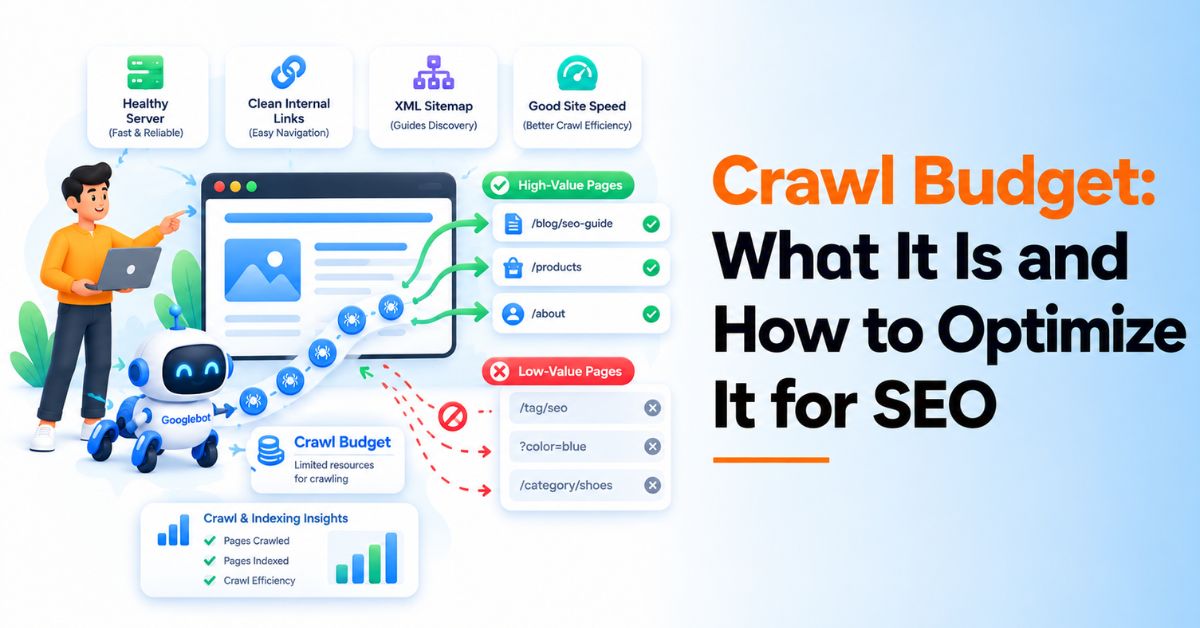
Crawl budget is the amount of crawling that Google can and wants to spend on a website over a given period.
For most small websites, crawl budget is not something that needs regular attention. Google says sites with fewer than a few thousand URLs are generally crawled efficiently, provided there are no major technical problems. Crawl budget becomes more important for large websites, frequently updated sites, ecommerce websites with many URL variations, and sites with a large number of URLs that Google has discovered but not indexed.
The goal is not simply to make Googlebot crawl more pages.
The goal is to help Google spend its available crawling resources on the URLs that matter.
What Is Crawl Budget?
Crawl budget refers to the set of URLs that Google can and wants to crawl on a website.
Google describes crawl budget using two main concepts:
- Crawl capacity limit: How much crawling a website can handle without affecting its servers.
- Crawl demand: How much Google wants to crawl the site's URLs based on factors such as popularity, freshness, and other signals.
This means that having a large website does not automatically mean Google will crawl every URL frequently.
A website can have thousands or millions of URLs, but Google still needs to decide which URLs are worth crawling and how often.
Crawl budget example
Imagine an ecommerce website has:
- 10,000 product pages
- 2,000 category pages
- 50,000 filtered URLs
- 10,000 parameter URLs
- Hundreds of duplicate URLs
If Google spends a large amount of its crawling activity discovering filters, duplicate URLs, and unnecessary variations, fewer resources may be available for important product and category pages.
This is why URL management is a major part of crawl budget optimization.
Does Every Website Need to Worry About Crawl Budget?
No.
This is one of the most important things to understand about crawl budget.
Google says most websites do not need to actively manage crawl budget. If new pages are crawled shortly after publication and the site does not have a very large or rapidly changing URL inventory, maintaining a clean sitemap and monitoring indexing is usually enough.
Crawl budget deserves more attention when you have:
- A very large website
- Thousands of pages that change frequently
- Ecommerce filters and faceted navigation
- Large numbers of URL parameters
- Many duplicate URLs
- Long redirect chains
- Large numbers of low-value pages
- A substantial number of "Discovered - currently not indexed" URLs
- Server performance or availability problems
Google's current guidance identifies sites with 1 million+ unique pages that change moderately often and sites with 10,000+ unique pages that change very frequently as examples where crawl-budget management can become particularly relevant. These are rough guidelines rather than strict thresholds.
How Does Google Determine Crawl Budget?
Google's crawling systems look at both the website's capacity and Google's demand to crawl its URLs.
1. Crawl Capacity
Googlebot needs to crawl a website without putting excessive load on its servers.
If a server responds quickly and reliably, Google may be able to crawl more efficiently.
If the server becomes slow or returns availability errors, Google can reduce crawling activity.
Server performance therefore matters for crawl efficiency.
2. Crawl Demand
Google also considers whether there is a reason to crawl a URL.
Factors can include:
- How popular a URL is
- How often its content changes
- Whether Google needs to refresh the content
- Whether the URL is known and considered useful
Google also notes that major site-wide events, such as a site migration, can temporarily increase crawling demand as Google processes URLs under the new structure.
So improving crawl budget is not simply about increasing server capacity.
You also need to make your URL inventory useful and easy for Google to understand.
Why Crawl Budget Matters for SEO
Crawling is the first step before Google can evaluate a page for indexing.
But crawling does not guarantee indexing.
Google explains that after crawling a page, it still evaluates the content and decides whether it should be included in the index.
That creates an important distinction:
Crawling → Evaluation → Indexing → Ranking
Improving crawl efficiency can help Google discover and revisit important pages, but faster crawling by itself does not guarantee better rankings.
If you are also reviewing your overall link acquisition strategy, this link building service guide explains the main service types, approaches, and factors to consider before choosing a link building solution.
Google explicitly states that crawl rate is not a ranking factor.
The objective should therefore be to make your site's important pages easy to discover and your URL inventory efficient to crawl.
What Can Waste Crawl Budget?
Several types of URLs can make crawling less efficient.
1. Duplicate URLs
Multiple URLs showing substantially the same content can create unnecessary crawling.
Common examples include:
- Different URL parameters
- HTTP and HTTPS versions
- Trailing-slash variations
- Duplicate category paths
- Tracking parameters
- Multiple URL versions created by filters
Google recommends consolidating duplicate content so crawling resources are focused on unique URLs.
2. Faceted Navigation
Ecommerce websites can generate thousands of URLs through filters.
For example:
/shoes/
could become:
/shoes/?color=black
/shoes/?color=black&size=10
/shoes/?color=black&size=10&brand=nike
Many combinations may not provide unique search value.
If these URLs can be generated indefinitely, they can create a large URL inventory for search engines to process.
3. URL Parameters
Parameters used for tracking, sorting, filtering, or session management can create additional URL variations.
Not every parameter URL needs to be crawlable.
Review which URL variations provide unique value and which simply duplicate existing content.
4. Redirect Chains
Long redirect chains make crawling less efficient.
For example:
URL A → URL B → URL C → URL D
is less efficient than:
URL A → URL D
Google's current crawl-budget guidance recommends avoiding long redirect chains.
5. Low-Value URLs
Large websites can accumulate URLs that provide little search value.
Examples can include:
- Thin pages
- Duplicate pages
- Empty category pages
- Internal search results
- Unnecessary filtered URLs
- Expired pages with no useful replacement
- Automatically generated URL variations
Google has specifically identified low-value URL patterns as an issue that can consume crawling resources unnecessarily.
9 Ways to Optimize Crawl Budget
1. Keep Your XML Sitemap Clean
Your XML sitemap should help Google discover the URLs that matter.
Include important:
- Category pages
- Product pages
- Service pages
- Blog posts
- Landing pages
- Other indexable canonical URLs
Avoid filling your sitemap with URLs that are:
- Redirected
- Canonicalized elsewhere
- Noindexed
- Broken
- Permanently removed
Google recommends keeping sitemaps up to date and using them to identify important or recently updated pages.
You can use a free XML sitemap extractor to review a site's sitemap URLs, identify patterns, and compare URL inventories during a technical SEO audit.
2. Improve Internal Linking
Internal links help Google discover URLs and understand the relationship between pages.
Google recommends making important pages accessible through crawlable links and says every page you care about should have a link from at least one other page on your site.
For example, a service page could link to:
- Related service pages
- Supporting blog posts
- Relevant tools
- Category pages
- Important commercial pages
Avoid creating important pages that can only be reached through complicated navigation or isolated URL structures.
3. Reduce Duplicate URLs
Review your URL inventory for unnecessary variations.
Look for:
- Parameter URLs
- Duplicate paths
- Multiple versions of the same page
- Case variations
- Tracking URLs
- Duplicate category structures
Where appropriate, use canonicalization, redirects, or URL management techniques to consolidate duplicate versions.
4. Control Faceted Navigation
Filters are useful for users, but not every filter combination needs to become a search-engine destination.
Review which combinations have genuine search value.
For example, an ecommerce site may want Google to discover:
/running-shoes/
and possibly:
/running-shoes/mens/
But thousands of combinations involving color, size, price, sorting, and filters may not need to be treated as separate search pages.
Google provides specific guidance for managing faceted navigation because it can generate very large numbers of URLs.
5. Fix Redirect Chains
Whenever a URL is permanently moved, try to point the old URL directly to the final destination.
Instead of:
A → B → C
use:
A → C
This reduces unnecessary requests and gives Google a clearer path through the site.
6. Improve Server Performance
Server response time can affect crawling efficiency.
Google explains that if a site responds quickly and reliably, its crawlers may be able to crawl more content. If Google encounters server problems, crawling can slow down.
Monitor:
- Server response times
- 5xx errors
- Timeouts
- Availability issues
- Resource-heavy pages
- Rendering performance
For larger websites, reviewing server logs can also help identify how Googlebot is accessing the site.
7. Remove or Manage Unnecessary URLs
Do not allow your website to create thousands of URLs that have little or no value.
Review URL patterns generated by:
- Internal search
- Filters
- Sorting
- Tracking
- Session IDs
- Duplicate categories
- Old content
- Application features
The objective is not to block URLs randomly.
The objective is to maintain a useful, controlled URL inventory.
8. Use Robots.txt Carefully
Robots.txt can prevent Googlebot from crawling specific URL patterns.
However, it should not be treated as a replacement for every indexing-control method.
Google's documentation notes that URLs blocked by robots.txt are not crawled, while noindex requires Google to crawl the page to see the directive.
Use robots.txt when you want to prevent crawling of URLs or resources that Google should not access.
For pages that should not appear in search results, use the appropriate indexing controls instead.
9. Keep Important Pages Easy to Discover
Your most important pages should have clear paths from other relevant pages.
A simple structure might look like:
Homepage → Service Category → Service Page → Supporting Content
For example:
Homepage → SEO Services → Link Building → Link Building Guide
This gives users and search engines a logical path through the website.
Crawl Budget vs. Indexing: What Is the Difference?
Crawling and indexing are related but different.
|
Crawling |
Indexing |
|
Googlebot accesses a URL |
Google evaluates whether to include the page in its index |
|
Happens before indexing |
Happens after crawling and processing |
|
Concerned with discovery and fetching |
Concerned with search eligibility and inclusion |
|
Can be affected by server capacity |
Can be affected by content quality, duplication, canonicalization and other signals |
A page can be crawled without being indexed.
This is why simply increasing crawling does not automatically solve indexing problems.
If many URLs are crawled but remain outside Google's index, investigate the quality, uniqueness, internal linking, canonicalization, and overall value of those pages rather than focusing only on crawl rate. Google also notes that pages may not appear in search even after crawling if there is insufficient value or user demand.
Crawl Budget vs. Crawl Rate
These terms are often used interchangeably, but they are not exactly the same.
Crawl rate refers to how quickly Googlebot can make requests to a website while respecting its server capacity.
Crawl demand refers to Google's desire to crawl the site's URLs.
Crawl budget combines these concepts into the amount of crawling Google can and wants to perform for the site.
Increasing crawl rate alone does not mean Google will crawl every URL on your website.
How to Check Crawl Issues in Google Search Console
Google Search Console provides several useful reports for investigating crawling and indexing.
Crawl Stats
The Crawl Stats report can help identify:
- Googlebot activity
- Crawl requests
- Response times
- Host availability issues
- HTTP response patterns
Google recommends using Crawl Stats when investigating crawling problems.
Page Indexing Report
Use the Page Indexing report to identify patterns such as:
- Crawled - currently not indexed
- Discovered - currently not indexed
- Duplicate pages
- Redirected pages
- Blocked pages
- Server errors
Do not treat every excluded URL as a problem.
The important question is whether Google is failing to crawl or index URLs that are genuinely important to your business.
URL Inspection
URL Inspection can help you investigate individual URLs.
For a small number of important pages, you can also request recrawling. Google notes that repeated indexing requests do not make a URL crawl faster, and requesting indexing does not guarantee inclusion in search results.
Crawl Budget and Internal Links
Internal linking is particularly important for large websites.
Google uses links to discover new pages and understand relationships between pages.
A strong internal linking structure can help you:
- Connect related pages
- Surface important URLs
- Reduce orphan pages
- Pass contextual relevance between pages
- Create clearer site architecture
For example, a link building guide can naturally connect to relevant link building services when the reader needs a service rather than additional educational content.
The link should make sense in context rather than being added only for SEO. If link acquisition is part of your SEO plan, understanding link building pricing can also help you evaluate costs across different types of placements and services.
Does Page Speed Improve Crawl Budget?
It can improve crawl efficiency, but the relationship is more nuanced than "faster pages = higher rankings."
Google says faster server responses can allow Googlebot to crawl more pages, while slow responses, timeouts, and server errors can reduce crawling.
However, improving the speed of thousands of low-value URLs does not automatically make Google want to crawl them more.
A better approach is:
Improve server performance + reduce unnecessary URLs + strengthen important pages.
That combination makes your crawl activity more efficient.
Common Crawl Budget Mistakes
Mistake 1: Trying to Increase Crawl Rate on a Small Website
Most small websites do not have a crawl-budget problem.
If Google discovers and crawls your new pages normally, focus on content, technical SEO, internal linking, and indexing rather than trying to force more crawling.
Mistake 2: Blocking Everything in Robots.txt
Blocking large sections of a website without understanding how Google discovers and processes those URLs can create new technical problems.
Use robots.txt selectively.
Mistake 3: Assuming More Crawling Means Better Rankings
Crawl rate is not a ranking factor.
More crawling does not automatically mean better rankings.
Mistake 4: Ignoring Internal Links
A page can be technically indexable but still difficult for Google to discover if the site's internal linking structure is weak.
Mistake 5: Putting Every URL in the Sitemap
A sitemap should help Google understand which URLs are important.
It should not become a complete dump of every URL your website can generate.
Mistake 6: Using noindex as a Crawl-Budget Solution
A noindex directive does not prevent Google from crawling the URL initially because Google has to access the page to see the directive. Google specifically distinguishes indexing control from crawl control.
Crawl Budget Checklist
Use this checklist when auditing a large website:
- XML sitemap contains important canonical URLs
- Sitemap does not contain unnecessary redirects or broken URLs
- Important pages have internal links
- Orphan pages have been identified
- Duplicate URL patterns have been reviewed
- Faceted navigation is controlled
- Unnecessary URL parameters are managed
- Redirect chains have been removed
- Server response times are monitored
- 5xx errors and timeouts are investigated
- Robots.txt does not accidentally block important content
- Low-value URL patterns have been reviewed
- Google Search Console Crawl Stats is monitored
- Page Indexing patterns are reviewed
- Important new or updated URLs are included in the sitemap
Final Takeaway
Crawl budget is less about getting Googlebot to crawl more pages and more about helping Google spend its crawling resources efficiently.
For most websites, the fundamentals are enough:
Keep your sitemap clean. Build strong internal links. Reduce unnecessary URLs. Fix redirects. Control duplicate and faceted URLs. Keep your server reliable. Monitor crawling and indexing in Google Search Console.
For large websites, these practices become especially important because a poorly managed URL inventory can make it harder for Google to discover and revisit the pages that matter most.
If your site has thousands of URLs, start by understanding which URLs Google is crawling, which ones it is ignoring, and why. Then improve the parts of your site that are creating unnecessary crawling instead of trying to increase crawl activity blindly.
Frequently Asked Questions
Crawl budget is the set of URLs that Google can and wants to crawl on a website. It is influenced by the site's crawl capacity and Google's crawl demand.
Crawl budget itself is not a Google ranking factor. Improving crawling can help Google discover and process pages, but a higher crawl rate does not automatically improve search rankings.
Improve crawl efficiency by keeping your URL inventory clean, maintaining accurate sitemaps, strengthening internal links, reducing unnecessary duplicate URLs, controlling faceted navigation, fixing redirect chains, and maintaining reliable server performance.
Google allocates crawling resources to websites, but most small websites do not need to actively manage crawl budget. It becomes more relevant for very large, frequently updated sites or websites with substantial crawling and indexing issues.
Yes. URLs disallowed through robots.txt are not crawled by Googlebot. However, robots.txt should be used carefully and is not the same as a noindex directive.
Not immediately. Google has to crawl a page to discover its noindex directive. Over time, removing URLs from the index can help Google focus on other URLs, but noindex should primarily be used when the goal is to keep a page out of search results.
Server performance can affect crawl efficiency. Google may crawl more efficiently when a site responds quickly and reliably, while slow responses and server errors can cause crawling to slow down.
Google Search Console's Crawl Stats report provides information about Googlebot crawling activity, response times, and host availability. The Page Indexing report can then help you investigate which URLs are being indexed or excluded.
There is no need to monitor crawl budget constantly for most websites. Review crawling and indexing when you launch a large number of pages, change your URL structure, migrate a website, add faceted navigation, or notice significant indexing issues.